

Contractor Website Planning and Cost Guide
Know what the website must do, what it will require, and which costs belong in the first scope.
A contractor website is not complete because it has a home page and a contact form. It is complete when a homeowner can understand the work, verify the fit, take the right next action, and receive a dependable response. Planning those decisions before design protects the budget and produces a site the business can actually operate.
Start with the customer decision
Write down the questions a qualified customer needs answered before calling: what work you perform, where you perform it, what kinds of projects fit, what proof exists, and what happens after an inquiry. Those answers define the information architecture more reliably than a list of fashionable website features.
For a local-service business, the highest-value paths usually connect a service and location to proof and then to a call, form, estimate request, or booking step. A useful plan names the owner of each response path and what the customer should expect next.
Audience and fit
Define homeowner, property manager, commercial, emergency, project-size, and service-area fit without trying to speak to everyone.
Decision evidence
Inventory licenses, process photos, completed work, warranties that can be supported, supplier credentials, and review sources you are permitted to use.
Next action
Choose when a call, short form, detailed estimate request, or scheduling step is appropriate and who owns the response.
Scope the pages that carry real weight
Most contractor websites need a focused core: home, service overview, one useful page for each priority service, an about or trust page, work or project evidence, service-area guidance, contact, privacy, and accessible form states. Add pages because they answer a distinct customer question, not because a competitor has hundreds of thin location pages.
A service page should explain the problem, suitable projects, process, common decisions, evidence, exclusions, and next step. A location page should contain genuine local operating context. Repeating the same copy with a city name changed creates a weak customer experience and a fragile search strategy.
Core launch set
Prioritize the pages needed to understand the company, the work, the service area, the proof, and the contact path.
Expansion backlog
Record lower-priority services, educational resources, projects, and locations as a measured post-launch backlog.
Content ownership
Decide who supplies facts, photographs, project details, approvals, and future updates before production begins.
Understand the major cost drivers
Website cost grows with original strategy, page variety, copy and media production, integrations, ecommerce, custom calculators, accessibility remediation, migration complexity, and the amount of review required. A lower page count can still be a larger project when the customer journey or operating workflow is complex.
Separate one-time build costs from recurring hosting, domains, licenses, care, analytics, call tracking, messaging, and content. Ask whether source files, accounts, credentials, domains, analytics properties, and licensed assets will be controlled by the business. A clear price without clear ownership can become expensive later.
Strategy and content
Discovery, page planning, copy, photography, and proof preparation often determine quality more than the page builder.
Function and integration
CRM routing, scheduling, payments, estimating, chat, call tracking, and automation add setup, testing, and provider costs.
Care after launch
Budget for updates, recovery, monitoring, accessibility, performance, content changes, and an accountable owner.
Require a launch and ownership plan
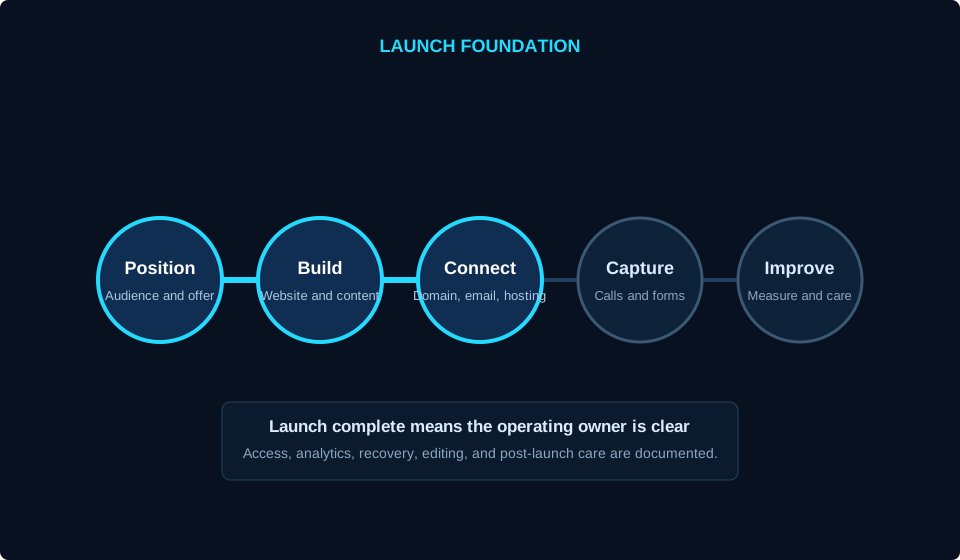
A professional launch covers forms, email delivery, mobile layouts, keyboard use, analytics events, redirects, metadata, backups, DNS, certificates, cookie behavior, error states, and rollback. The checklist should name who performs each task and who decides whether the release is accepted.
After launch, document editing access, source ownership, renewals, licenses, hosting, domain control, backups, restoration, support, and change requests. The goal is not paperwork for its own sake. It is preventing the business from discovering during an urgent change that nobody knows who controls the system.
Acceptance checks
Test the important customer journeys on real mobile and desktop sizes before changing DNS or campaigns.
Account inventory
Record the business owner for domains, hosting, email, analytics, profiles, licenses, and integrations.
First 30 days
Review form delivery, calls, search visibility, performance, customer questions, and the next highest-value content gap.
Use this before the next decision.
- Primary customers and services are defined
- Service area and project fit are truthful
- Proof and media have an owner
- Every lead path has a response owner
- One-time and recurring costs are separated
- Domains, accounts, source, and licenses have named owners
- Launch tests and rollback are documented
- Post-launch care is included or assigned
Related guides
Turn the website brief into a buildable plan.
Use the HostAvvy finder to connect the website, hosting, visibility, lead capture, and care needs that belong in the first phase.